Everything I know about the web
Written on March 7, 2026. Last updated on: March 15, 2026
Written on March 7, 2026. Last updated on: March 15, 2026
This post is a running document of everything I can talk about when someone asks me
What happens when I type a url into a browser’s address bar and hit enter?
I’m not an expert at CPU and rendering engines and GUI so for now I’ll stick to the software side of things. Specifically the parts that integrate with the Internet
The first thing the browser does is called DNS Resolution
Systems on the internet find each other through addresses called IP addresses. When you type in a URL, like https://www.google.com/search?q=what+is+dns, a browser doesn’t know where to go to get its content.
And the process of getting the IP address for the URL is known as DNS Resolution.
DNS stands for Domain Name System and like the millions of articles will tell you, its the “address book of the internet”.
Every URL has a protocol (like http or https), a domain (like google), and a top-level-domain or TLD (like .com). In addition to this, a URL can have a subdomain (like www) and a path (like /search) and a query (like q=what+is+dns).
Below is a quick reference diagram for how the DNS resolution process works.
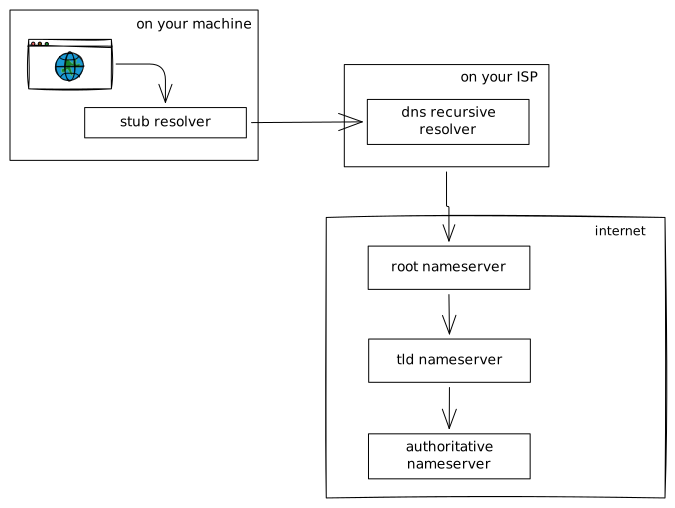
Every part of the process first checks a cache. And will only propogate the request to the next part if there’s a cache miss.
The browser first checks its own cache. If it can’t find the IP for the URL, it then makes a call to the stub resolver. This is a function that’s part of the operating system and converts the URL from the browser to a DNS Request that can be shipped off to a DNS Resolver. Again, there’s a cache check in the stub resolver.
The DNS resolver first makes a call to the root nameserver. This is the first call for every resolution process. The root nameserver is a set of 13 servers (a through m) whose IPs are statically hardcoded in the DNS resolver.
The root nameservers job is to point to the IP for the Top-Level-Domain (like .com or .net). And the request then makes its way to that tld nameserver. The tld nameserver then provides the IP for the authoritative nameserver, which is the source of truth for the IP of the domain in the URL.
Sometimes, there’s also a subdomain that needs to be resolved, and if the DNS entry for the subdomain points to a different tld or another domain, then the whole DNS Resolution process for the subdomain starts over at the root nameserver, or the tld nameserver respectively.
What does it mean for the subdomain to point to another tld or another domain? When you setup a DNS entry for your URL, you will usually setup an A record.
The different types of DNS entries are
A : Maps a URL to an IPv4 address.AAAA: Maps a URL to an IPv6 address.CNAME: Maps a subdomain URL to another URL (like a subdomain entry).MX: Maps a host to a mailserver.TXT: Holds metadata for a host.Finally at the end of this process, a browser gets an IP for the URL that a user typed in. And it can now make a HTTP request to the IP.
Once the browser knows the IP address it needs to call, it makes a HTTP request.
HTTP i.e. the Hyper Text Transfer Protocol is a protocol/language for different systems on the internet to talk to each other.
Taken directly from RFC 9110 that defines a HTTP request -
Each message is either a request or a response. A client constructs request messages that communicate its intentions and routes those messages toward an identified origin server. A server listens for requests, parses each message received, interprets the message semantics in relation to the identified target resource, and responds to that request with one or more response messages. The client examines received responses to see if its intentions were carried out, determining what to do next based on the status codes and content received.
For the rest of this section, I’m going to talk about HTTP 1.1. There’s a new-ish version of HTTP called HTTP/2 but I don’t know enough about it to talk about it yet.
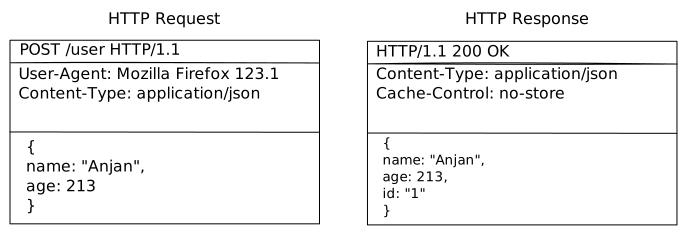
Each HTTP request message consists of
start-line : This consists of the method, a path, and a HTTP protocol version.headers : This consists of key-value pairs.empty line : To indicate that the above metadata has completed.body : When the HTTP request needs to send more data in the body.Note that the above is the structure for a request but the response is pretty similar too. The only difference is that the start-line has a statusCode indicating the status of resolving the request.
Speaking of statusCodes, there are 4 buckets of status codes
2xx : Some form of success3xx : Some form of redictions4xx : Some form of client errors5xx : Some form of server errors.Some of the one’s I’ve come across so far are
HTTP is pretty tightly coupled with client-server architectures i.e. a lot of clients and servers communicate using HTTP messages so I’ll probably write a bit more about what client-server architectures are in the future but this is essentially everything I know about HTTP.
Now that we know what a HTTP request/response is, how does this HTTP request go all the way from the client to the server i.e. how does the browser send this HTTP request to the IP address it resolved through the DNS process?
That is done through the TCP or the Transmission Control Protocol.